A task-first brand clarity system that helps teams find, understand, use, and verify the guidance behind the work they are making.
3 paths
Create, find, or check from one task-first home
4 steps
Find → Understand → Use → Verify
6 min
Core prototype story: build a sales presentation
1 source
Every answer carries source, status, and owner
01 / Problem
Most organizations already have brand guidance. The problem is that it is scattered across PDFs, folders, slide decks, asset libraries, and the memories of a few experienced people.
When someone needs to make a sales presentation, campaign, proposal, or social post, they are rarely asking for “the brand guide.” They are asking a practical question: what applies to the work I am making right now?
Conventional brand portals organize files. DAM platforms manage assets. Chatbots answer questions. None of those patterns alone turns governed guidance into confident action.
The core diagnosis
The failure is not missing information. It is the distance between stored brand guidance and the decision someone must make while doing real work. BrandLockBox closes that distance.
02 / Strategic Direction
Competitive review made the positioning choice clear. BrandLockBox should not compete on enterprise asset management, template production, or the number of integrations. Those paths would turn it into a thinner version of an established platform.
The sharper opportunity is operational brand clarity: make approved brand truth visible, trustworthy, and actionable for the job at hand. BrandLockBox is the brand-truth product inside the broader Marketing Clarity OS concept.
Job-based guidance
The entry point
Governed answers
The trust model
Actionable readiness
The differentiator
03 / Solution
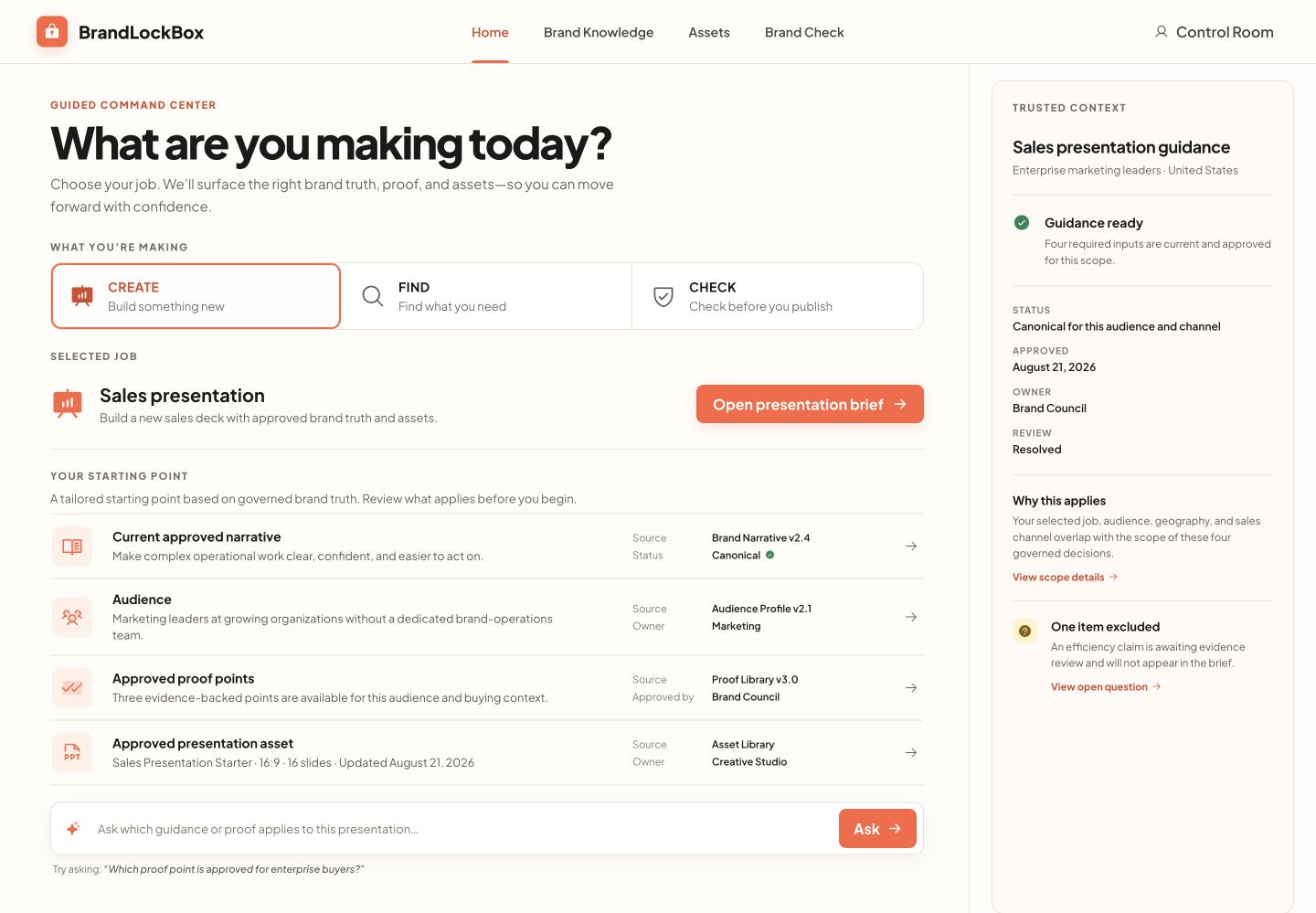
BrandLockBox is a Brand Command Center organized around the work a person needs to complete. The home screen offers three plain-language paths: CREATE something new, FIND approved guidance or assets, or CHECK work before it ships.
Beneath that simple interface is structured brand knowledge spanning Identity, Voice, Message, Application, Governance, and Assets. Answers are contextual to the job and traceable to their source, approval status, and owner.
How it works
Step 1
Step 2
Use
Apply the right narrative, proof, audience guidance, and approved assets to the current job.
Step 3
The design insight
The interface stays intentionally simple because the complexity belongs in the trust model, not on the user’s screen. The prototype demonstrates that idea through one six-minute scenario: creating a sales presentation with approved narrative, audience guidance, proof, and assets.
04 / Execution
Product Definition
Reframing the product around brand truth
Revisited the original website, audience, and competitive landscape. The key decision was to stop treating BrandLockBox as a prompt tool or asset platform and define it as the brand-truth product within Marketing Clarity OS.
Design System & UX
A task-first Command Center
Translated the strategy into a warm, approachable interface with three immediate paths—CREATE, FIND, and CHECK—and a persistent Trusted Context layer tied to the selected job.
Prototype Build
A polished interactive portfolio prototype
Built the selected Command Center direction as a responsive React prototype. The presentation brief, contextual guidance, Ask BrandLockBox response, and trust metadata are interactive and use realistic fixture content.
Adversarial Review
Checked the design against its own thesis
Reviewed the layout against competitors and the agreed product boundaries. The result preserved contextual guidance and provenance while avoiding the familiar DAM grid, generic dashboard, and chatbot-first patterns.
05 / Prototype Build
This is a portfolio prototype, not a production SaaS application. The implementation is intentionally limited to the interactions needed to communicate the product idea clearly and credibly.
AI & Development
Front-End
Prototype Data
Verification
Design
Scope
06 / Outcomes
BrandLockBox now has a coherent product thesis and a polished interactive prototype that makes the idea tangible. The Command Center demonstrates the strongest parts of the experience: selecting a job, reviewing contextual guidance, opening a governed brief, and asking a question whose answer carries visible provenance.
It is intentionally presented as a portfolio concept rather than a launched application. CREATE is the developed demonstration path; FIND and CHECK communicate the larger product vision. No production backend, authentication, live AI retrieval, or customer-data processing is claimed.
✓
Product direction defined and differentiated
✓
Responsive Command Center prototype built
✓
Positioned honestly as a portfolio prototype
What the prototype proves
Clarity
Job first
Guidance starts from what someone needs to make
Trust
Traceable
Source, status, owner, and scope stay visible
Action
Ready
Approved guidance becomes a concrete starting point
BrandLockBox shows how I move from an ambiguous product idea to a differentiated strategy, a clear interaction model, and a polished prototype. If you need that combination of marketing systems thinking and product execution, let's talk.